This document briefly details how user/developers can set up a remote machine on FabSim3 for job submission.
How to run a Convection2D and Convection3D (test) Jobs
These examples assume that you have been able to run the basic FabSim examples described in the other documentation files, and that you have built and configured Nektar++ (https://www.nektar.info/) on the target machine, also will be assumed that the location (Convection2D_exec) has been specified in the file machines_FabNEPTUNE_user.yml.
All the input files required for a Convection2D simulation should be contained in a directory in config_files.
A minimal example Convection2D simulation is provided in config_files/Convection2d_test1, to execute this example type:
fabsim localhost Convection2D_local:convection_2d_test
Run Ensemble Examples
Convection2D_ensemble
These examples assume that you have been able to run the basic FabSim examples described in the other documentation files, and that you have built and configured Nektar++ (https://www.nektar.info/) on the target machine.
To run type:
fabsim localhost Convection2D_ensemble_local:Convection2D_ensemble_example
FabNEPTUNE looks for a directory called Convection2D_ensemble_example in config_files. It then looks for a sweep directory (by default called SWEEP) that contains a number of input files to iterate through. All the files in Convection2D_ensemble_example directory and one of the sweep directory files will be copied to the host in separate directories (one for each sweep file) and executed in the normal way. This example runs 3 simulations with different input files, which vary the simulation timestep, using the same topology file.
Convection3D_ensemble
These examples assume that you have been able to run the basic FabSim examples described in the other documentation files, and that you have built and configured Nektar++ (https://www.nektar.info/) on the target machine.
To run type:
fabsim <remote machine name> Convection3D_ensemble_remote:Convection3D_ensemble_example
FabNEPTUNE looks for a directory called Convection3D_ensemble_example in config_files. It then looks for a sweep directory (by default called SWEEP) that contains a number of input files to iterate through. All the files in Convection3D_ensemble_example directory and one of the sweep directory files will be copied to the host in separate directories (one for each sweep file) and executed in the normal way. This example runs 3 simulations with different input files, which vary the simulation timestep, using the same topology file.
EasyVVUQ+FabNEPTUNE
These examples assume that you have been able to run the basic FabSim examples described in the other documentation files, and that you have built and configured Nektar++ (https://www.nektar.info/) on the target machine.
Note
All the easyvvuq campaign runs and execution, and the results analyse will be done on target machine which can be your localhost or remote HPC machine.
The input files needed for this example are found in plugins/FabNEPTUNE/config_files/convection_2d_easyvvuq_InRuAn*_QCGPJ. This directory contains the following files that can be modified for your own purpose:
convection_2d_remote.template: is the convection2d input script inconvection_2d_easyvvuq_InRuAn*_QCGPJsubfolder, EasyVVUQ will substitute certain variables in this file to create the ensemble.campaign_params_remote.yml: is the configuration file, inconvection_2d_easyvvuq_InRuAn*_QCGPJsubfolder, for EasyVVUQ sampler. If you need different sampler, parameter to be varied, or polynomial order, you can set them in this file.
Execution
After updating the following files with your credentials
FabSim3/deploy/machines_user.yml
FabSim3/deploy/machines.yml
FabSim3/plugins/FabNEPTUNE/machines_FabNEPTUNE_user.yml
<remote machine> can be your localhost or a HPC resources.
To run type:
fabsim   localhost   Convection2D_init_run_analyse_campaign_local:convection_2d_easyvvuq_InRuAn*_QCGPJ
fabsim   <remote machine name>   Convection2D_init_run_analyse_campaign_remote:convection_2d_easyvvuq_InRuAn*_QCGPJ
To copy the results back to your local machine type:
fabsim  localhost   fetch_results
fabsim  <remote machine name>   fetch_results
EasyVVUQ+EasySurrogate+FabNEPTUNE
These examples assume that you have been able to run the basic FabSim examples described in the other documentation files, and that you have built and configured Nektar++ (https://www.nektar.info/) on the target machine.
Note
All the EasyVVUQ and EasySurrogate campaigns runs and execution, and the results analyse will be done on target machine which can be your localhost or remote HPC machine.
The input files needed for this example are found in plugins/FabNEPTUNE/config_files/convection_2d_easyvvuq_easysurrogate_InRuAn*_DAS_QCGPJ. This directory contains the following files that can be modified for your own purpose:
convection_2d_remote.template: is the convection2d input script inconvection_2d_easyvvuq_easysurrogate_InRuAn*_DAS_QCGPJsubfolder, EasyVVUQ will substitute certain variables in this file to create the ensemble.campaign_params_remote.yml: is the configuration file, inconvection_2d_easyvvuq_easysurrogate_InRuAn*_DAS_QCGPJsubfolder, for EasyVVUQ sampler. If you need different sampler, parameter to be varied, or polynomial order, you can set them in this file.
Execution
After updating the following files with your credentials
FabSim3/deploy/machines_user.yml
FabSim3/deploy/machines.yml
FabSim3/plugins/FabNEPTUNE/machines_FabNEPTUNE_user.yml
<remote machine> can be your localhost or a HPC resources.
To run type:
fabsim   localhost   Convection2D_init_run_analyse_campaign_local:convection_2d_easyvvuq_easysurrogate_InRuAn1_DAS_QCGPJ
fabsim   <remote machine name>   Convection2D_init_run_analyse_campaign_remotel:convection_2d_easyvvuq_easysurrogate_InRuAn1_DAS_QCGPJ
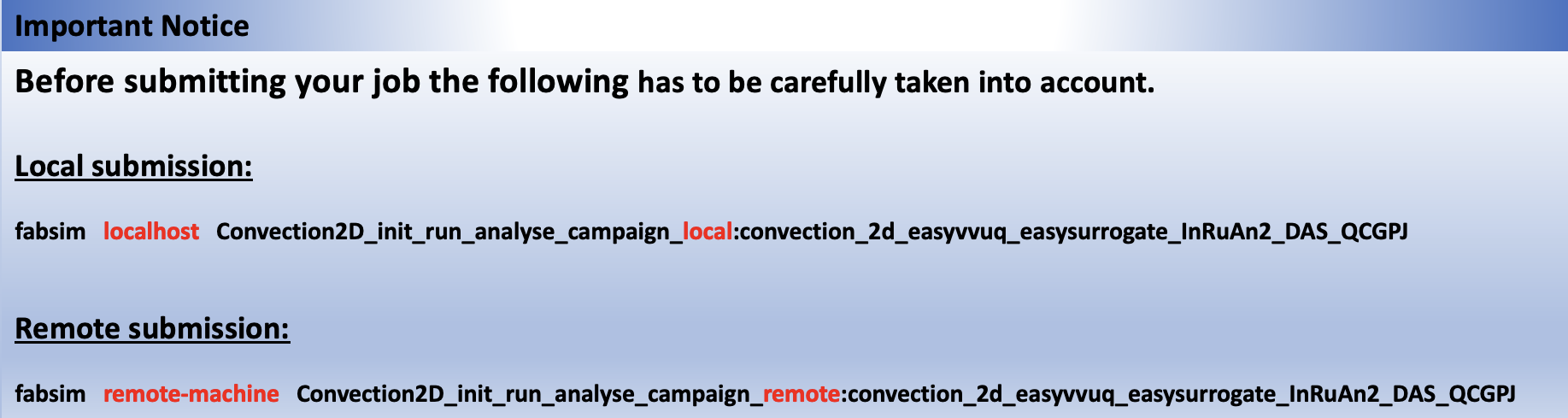
fabsim   localhost   Convection2D_init_run_analyse_campaign_local:convection_2d_easyvvuq_easysurrogate_InRuAn2_DAS_QCGPJ
fabsim   <remote machine name>   Convection2D_init_run_analyse_campaign_remote:convection_2d_easyvvuq_easysurrogate_InRuAn2_DAS_QCGPJ
To copy the results back to your local machine type:
fabsim  localhost   fetch_results
fabsim  <remote machine name>   fetch_results